Main Feature
LeetCode Commands
For available commands, please refer to README.
LeetCode Problem Thread Creation
/problem <problem_id> Creates a thread for the specified LeetCode problem ID.
This command generates a dedicated discussion thread for the given problem, allowing users to collaborate and share solutions.
Logic Flow:
- User invokes
/problem <problem_id>. - The bot first checks if a thread for the problem already exists.
- If not, it will get the problem first from cache, and then from database, and finally from LeetCode API if not found.
- Once the problem data is retrieved, the bot creates a new thread in the designated channel configured for the server.
- The bot populates the thread with the problem details, including title, difficulty, and a link to the problem on LeetCode.
- The bot sends a confirmation message to the user with a link to the newly created thread.
Involved files/modules and functions:
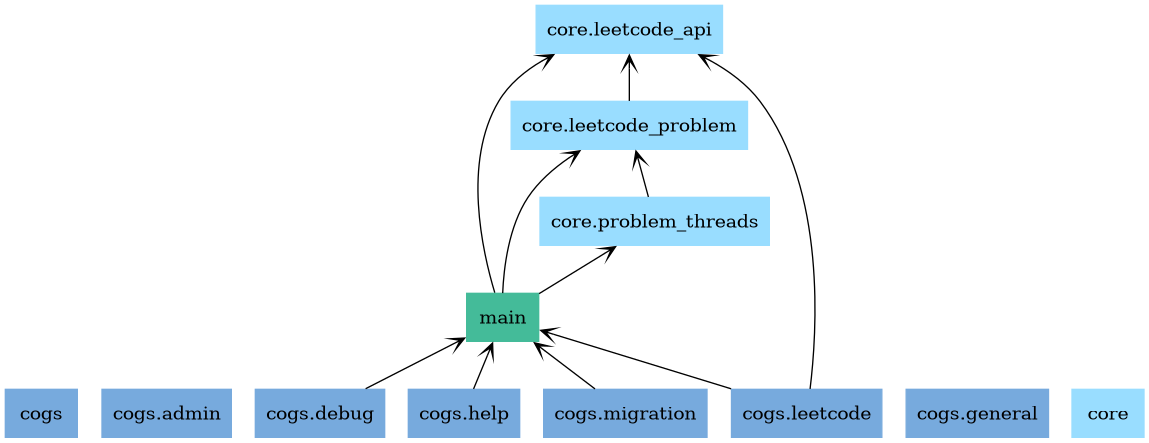
cogs/leetcode.py: Contains the command definition and logic for handling the/problemcommand.leetcode_problemfunction: Handles the command invocation and orchestrates the thread creation process._create_threadfunction: Responsible for creating the thread and populating it with problem details.get_problem_desc_embedfunction: Generates the embed message containing problem information.core/leetcode_api.py: Responsible for interacting with the LeetCode API.fetch_problem_by_idfunction: Fetches problem details using the provided problem ID.parse_single_problem_responsefunction: Parses the API response to extract relevant problem information.db/problem.py: Defines theProblemmodel used for database interactions.db/problem_threads.py: Defines theProblemThreadsmodel used to track created threads.core/leetcode_problem.py: Contains logic for managing LeetCode problems.get_problemfunction: Retrieves problem details from cache, database, or API.core/problem_threads.py: Manages the creation and tracking of problem discussion threads.get_forum_channelfunction: Determines the appropriate forum channel for thread creation.get_thread_by_problem_idfunction: Checks if a thread for the problem already exists.delete_threadfunction: Deletes a thread record from the database if the problem is found but the thread is missing in Discord.utils/discord_utils: Provides utility functions for Discord interactions.try_get_channelfunction: Safely retrieves a Discord channel by ID.
Flow Diagram:
flowchart TD
Start([User invokes /problem ID]) --> CheckThread{Thread exists?}

    %% Path if thread already exists
    CheckThread -- Yes --> ReplyLink[Reply with link to existing thread]

    %% Path if thread does not exist
    CheckThread -- No --> CheckCache{Check Cache}

    %% Data Retrieval Strategy
    CheckCache -- Found --> GetData[Retrieve Problem Data]
    CheckCache -- Not Found --> CheckDB{Check Database}

    CheckDB -- Found --> GetData
    CheckDB -- Not Found --> FetchAPI[Fetch from LeetCode API]
    FetchAPI --> GetData

    %% Creation Process
    GetData --> CreateThread[Create Thread in Forum Channel]
    CreateThread --> Populate[Populate: Title, Difficulty, Link]
    Populate --> Confirm[Send Confirmation Link to User]

    ReplyLink --> End([End])
    Confirm --> End
Daily Challenge Thread Creation
This command is similar to the /problem command but specifically targets the daily challenge problem.
Since we have to fetch the daily challenge problem from LeetCode API directly, the logic flow is slightly different:
- User invokes
/daily. - The bot fetches the daily challenge problem directly from LeetCode API.
- The bot checks if a thread for the daily challenge already exists.
- If not, it creates a new thread in the designated channel configured for the server.
- The bot populates the thread with the daily challenge problem details.
- The bot sends a confirmation message to the user with a link to the newly created thread.
Involved files/modules and functions:
cogs/leetcode.py: Contains the command definition and logic for handling the/dailycommand.leetcode_problemfunction: Handles the command invocation and orchestrates the thread creation process._create_threadfunction: Responsible for creating the thread and populating it with problem details.get_problem_desc_embedfunction: Generates the embed message containing problem information.core/leetcode_api.py: Responsible for interacting with the LeetCode API.get_daily_problemfunction: Fetches the daily challenge problem details from the LeetCode API.parse_daily_problem_responsefunction: Parses the API response to extract relevant problem information.db/problem.py: Defines theProblemmodel used for database interactions.db/problem_threads.py: Defines theProblemThreadsmodel used to track created threads.core/leetcode_problem.py: Contains logic for managing LeetCode problems.get_problemfunction: Retrieves problem details from cache, database, or API.core/problem_threads.py: Manages the creation and tracking of problem discussion threads.get_forum_channelfunction: Determines the appropriate forum channel for thread creation.get_thread_by_problem_idfunction: Checks if a thread for the problem already exists.delete_threadfunction: Deletes a thread record from the database if the problem is found but the thread is missing in Discord.utils/discord_utils: Provides utility functions for Discord interactions.try_get_channelfunction: Safely retrieves a Discord channel by ID.
Flow Diagram:
flowchart TD
Start([User invokes /daily]) --> FetchAPI[Fetch Daily Challenge from API]

    FetchAPI --> CheckThread{Thread exists?}

    %% Path if thread already exists
    CheckThread -- Yes --> ReplyLink[Reply with link to existing thread]

    %% Path if thread does not exist
    CheckThread -- No --> CreateThread[Create Thread in Forum Channel]
    CreateThread --> Populate[Populate: Daily Challenge Details]
    Populate --> Confirm[Send Confirmation Link to User]

    ReplyLink --> End([End])
    Confirm --> End
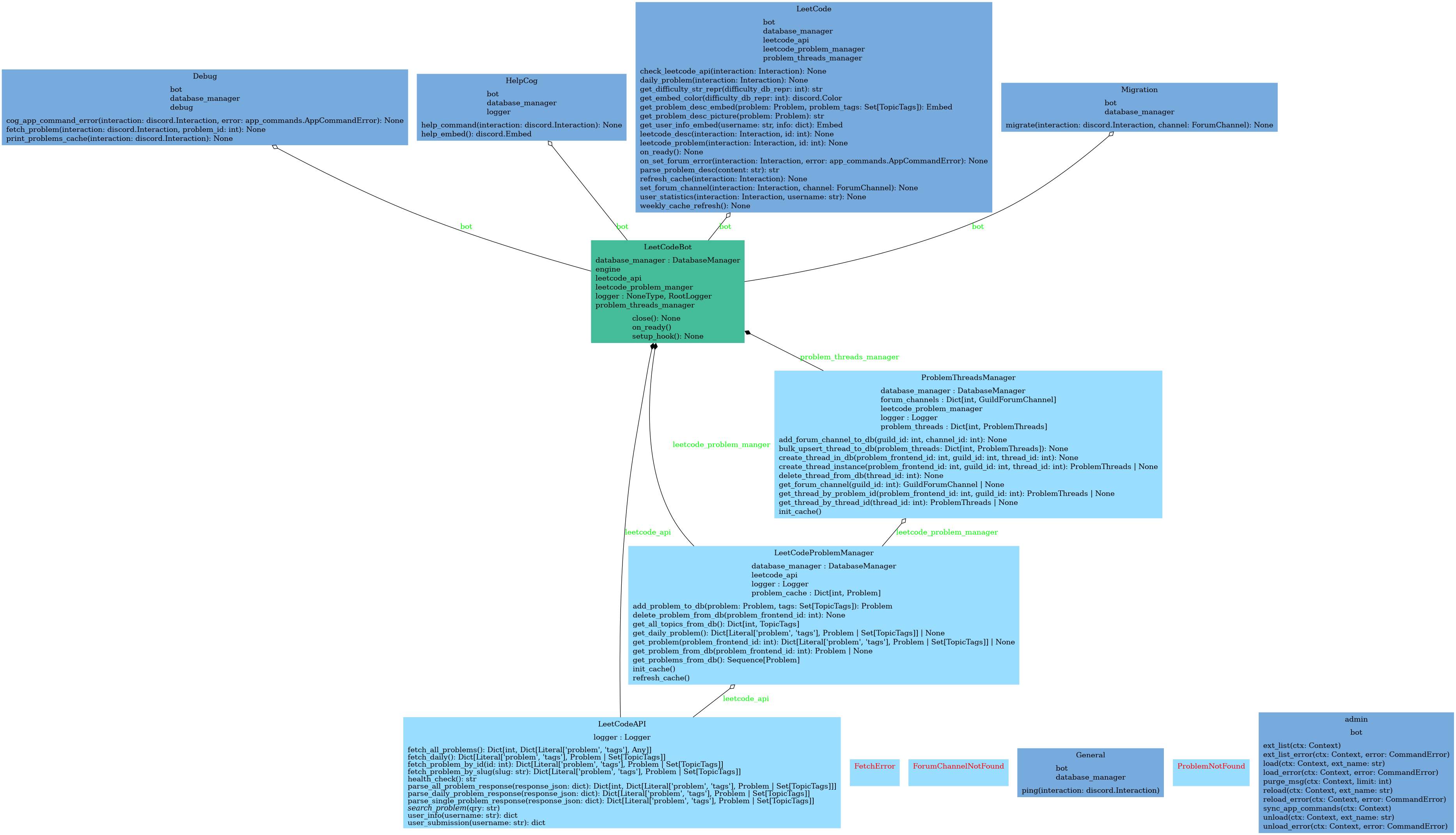
UML charts